
Google Cloud Platform powers some of the world’s most critical infrastructure. Yet, even the most capable cloud environment is only as secure as the configurations running inside it. In 2026, the trending path of attackers is to walk through doors that were/are left open. Misconfigured audit logs, overprivileged service accounts, publicly exposed storage buckets, and unprotected databases are now the entry points that threat actors are actively scanning for and exploiting at scale, often within minutes of exposure. What makes GCP misconfiguration particularly dangerous is how easy they are to miss. Many of these issues result from default settings, legacy configurations, etc. Also, the sheer complexity of managing permissions and access across a growing cloud environment is no less. This blog covers the major GCP security risks. Further, know how your team can close these gaps through GCP CSPM automated scanning.
Top 7 GCP Misconfigurations in 2026
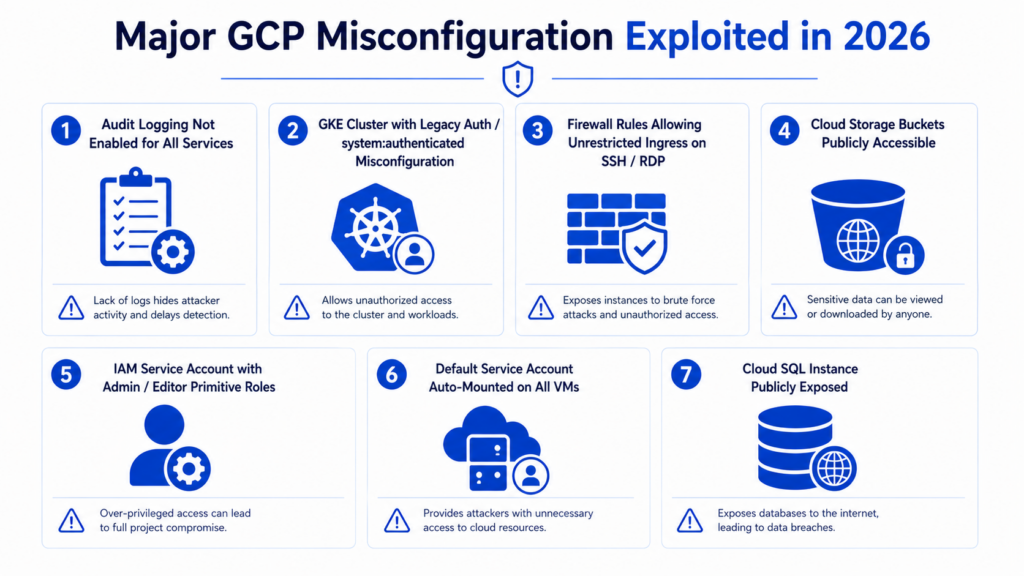
Here are the seven GCP security misconfigurations that are being most actively exploited right now. Understand what makes each one dangerous, and how your team can close these gaps through GCP CSPM automated scanning.
1. Audit Logging Not Enabled for All Services
GCP has two types of audit logs. The first type is Admin Activity logs. It is always turned on for free and records things like IAM changes and resource deletions. The second type is Data Access logs. It is turned off by default for most services because Google charges based on how much data is logged.
The real problem is that Data Access logs are not enabled for critical services like Cloud Storage, BigQuery, and Cloud SQL. This means nobody can see who is reading or writing sensitive data. If an attacker is quietly stealing data or moving through the environment, there is no record of it. Therefore, this makes detection and GCP security audit impossible.
2. GKE Cluster with Legacy Auth/system: authenticated Misconfiguration
There are two separate problems here. The first is ABAC. An old, deprecated authorization system that some Google Kubernetes Engine (GKE) clusters still have enabled. It is flagged as a risk by the CIS GKE Benchmark. The second and more dangerous problem in 2026 is a GCP security misconfiguration where the system:authenticated group, which includes any valid Google account and not just authorized users, is given powerful permissions inside the cluster. Moreover, Orca Security found over 1,300 clusters vulnerable to this in 2024.
The real attack vectors today are: the system:authenticated loophole, pods inheriting the permissions of the underlying node’s service account when Workload Identity is not enabled, and Operating System(OS) Login being disabled on GKE nodes.
3. Firewall Rules Allowing Unrestricted Ingress on SSH / RDP
Virtual Private Cloud (VPC) firewall rules that allow traffic from anywhere on the internet (0.0.0.0/0) on port 22 (SSH) or port 3389 (RDP) leave every matching Compute Engine instance open to attack. This is a well-known, actively exploited GCP misconfiguration covered under the CIS GCP Benchmark.
Automated bots continuously scan the internet for open SSH and RDP ports. They do so to attempt to break in through brute force or known vulnerabilities. In GCP environments, port 6443 (the Kubernetes API server) should be treated with equal urgency. This is because an exposed API endpoint without network restrictions is just as dangerous.
4. Cloud Storage Buckets Publicly Accessible
Cloud Storage buckets that include allUsers (literally anyone on the internet) or allAuthenticatedUsers (any Google account, worldwide) in their permissions are open to unauthorized access. This is the single most targeted GCP misconfiguration; automated scanning tools find and exploit public buckets within minutes of exposure. According to Google Cloud threat reports for 2025 – 2026, storage misconfigurations are the most commonly exploited vulnerability in GCP environments.

Book Your Free Cybersecurity Consultation Today!
5. IAM Service Account with Admin / Editor Primitive Roles
Service accounts assigned roles/editor or roles/owner have far more access than any individual workload should ever need. If an attacker compromises a single application or VM using one of these service accounts through code execution, SSRF, or a stolen key, they gain near-complete access to the entire GCP project. Also, Google’s own Threat Horizons reports for 2025 – 2026 identify overprivileged service accounts as a top way attackers move laterally inside GCP.
Roles/editor cannot directly change IAM policies, so it does not allow an attacker to promote themselves by editing permissions. However, it does allow creating Cloud Functions, triggering Cloud Build jobs, and deploying new resources, all of which can be abused for indirect privilege escalation. This indirect path is frequently overlooked.
6. Default Service Account Auto-Mounted on All VMs
Compute Engine instances that run under the default service account, which historically carries roles/editor across the whole project, are a well-known and actively exploited risk. If an attacker gets any kind of remote code execution on the VM, they can retrieve the service account’s credentials with a single command to the internal metadata server at 169.254.169.254. No authentication is needed for that request. Datadog Security Labs confirmed this attack path was still working in 2024 – 2025 for workloads not using Workload Identity Federation.
Google has started removing the automatic roles/editor grant for the default service account in new projects. However, this does not protect older projects, existing VM fleets, or environments where the role was manually re-added. The risk remains widespread.
7. Cloud SQL Instance Publicly Exposed
This finding has two layers. The more obvious risk is a Cloud SQL instance with 0.0.0.0/0 set in authorized networks, meaning any machine on the internet can attempt to connect to the database. The subtler risk is that any Cloud SQL instance with a public IP address, even one with restricted authorized networks, carries more inherent exposure than an instance using only a private IP. The database is still reachable over the internet, which increases the attack surface regardless of firewall rules. Enforcing SSL adds a layer of protection but does not eliminate this exposure.
Remediation For The Top Actively Exploited GCP Misconfigurations
| GCP Misconfiguration | How AutoSecT Helps |
| Audit Logging Not Enabled for All Services | AutoSecT’s GCP CSPM automated scanning detects GCP security misconfigurations like disabled audit logs across GCP services, delivering real-time analysis. Moreover, it also provides vulnerability compliance mapping and actionable AI-driven remediation insights through its centralized CISO and analytics dashboard. |
| GKE Cluster with Legacy Auth / system:authenticated Misconfiguration | AutoSecT’s AI-driven vulnerability scanner identifies insecure GKE configurations with near-zero false positives. It further prioritizes risks by severity (critical, high, low, medium, low) and provides AI-based patch recommendations to remediate cluster GCP misconfigurations efficiently. |
| Firewall Rules Allowing Unrestricted Ingress on SSH / RDP | AutoSecT runs real-time cloud monitoring and real-time exploit validation to detect unrestricted firewall rules across GCP environments. Thus, flagging critical exposures and streamlining remediation through detailed, actionable reports and customizable SLA. |
| Cloud Storage Buckets Publicly Accessible | AutoSecT’s automated cloud scanning detects publicly exposed storage buckets across GCP with real-time threat detection using Agentic AI. This helps discover and validate GCP misconfigurations before attackers can exploit them. |
| IAM Service Account with Admin / Editor Primitive Roles | AutoSecT’s AI-driven vulnerability analysis identifies overprivileged IAM service accounts, prioritizes them by business impact and exploitability within its VMDR framework, and provides AI-based patch recommendations to enforce least-privilege access. |
| Default Service Account Auto-Mounted on All VMs | AutoSecT’s cloud security scanning automatically detects default service account misuse across GCP VMs and GKE nodes, with risk-based prioritization ensuring the most exploitable credential exposures are surfaced and remediated first. |
| Cloud SQL Instance Publicly Exposed | AutoSecT’s scheduled automated cloud scans continuously monitor Cloud SQL instances for public IP exposure and insecure network configurations, delivering password-protected reports and real-time alerts through its centralized vulnerability management dashboard. |
AutoSecT is currently on a 15-day free trial. To know more about its GCP CSPM automated scanning aspect, check Cloud Security Posture Management (CSPM) by AutoSecT.
Join our weekly newsletter and stay updated
GCP Misconfigurations FAQs
- What are common cloud misconfigurations?
Common GCP misconfigurations include publicly accessible storage buckets, overprivileged IAM roles, exposed databases, unrestricted firewall rules, disabled logging, insecure Kubernetes settings, and improper service account permissions.
- Which misconfiguration most commonly exposes cloud data publicly?
Publicly accessible cloud storage buckets are the most common cause of unintended data exposure. In GCP, granting permissions to allUsers or allAuthenticatedUsers can make sensitive files accessible to anyone on the internet.
- Which misconfiguration often leads to cloud data breaches?
Overprivileged IAM accounts, public storage buckets, exposed databases, and unrestricted network access are among the leading causes of cloud data breaches. Attackers frequently exploit these GCP security misconfigurations to gain unauthorized access to sensitive resources.
- Why are GCP misconfigurations considered a major security risk?
They create unintended security gaps that attackers can exploit to access data, escalate privileges, move laterally across environments, or disrupt services. Many attacks succeed because misconfigured resources remain undetected for long periods.
- How can organizations detect GCP security misconfigurations?
Organizations can detect GCP security misconfigurations through continuous cloud security assessments, CSPM (Cloud Security Posture Management) solutions, automated configuration scanning, GCP security audits, and compliance monitoring tools that identify risky settings in real time.
- What is the most dangerous IAM misconfiguration in GCP?
Assigning broad permissions such as roles/editor or roles/owner to service accounts is one of the most dangerous IAM misconfigurations. If compromised, these accounts can provide attackers with extensive access across cloud resources.
- How often should GCP environments be scanned for misconfigurations?
GCP environments should be monitored continuously and scanned regularly, ideally daily or in real time. Continuous scanning helps identify newly introduced misconfigurations before attackers can exploit them.
- How does CSPM help prevent GCP misconfigurations?
A Cloud Security Posture Management solution continuously scans cloud environments, detects insecure configurations, maps findings to security benchmarks and compliance frameworks, prioritizes risks, and provides AI-driven remediation guidance to reduce the attack surface.