

Mobile apps handle banking transactions, health records, personal identities, and corporate data. All of those interactions travel over a network, making the communication channel a prime target for attackers. To defend it, developers implement SSL pinning. For security teams, though, SSL pinning creates a real obstacle: it blocks the traffic inspection that mobile app penetration testing depends on. That is why SSL pinning bypass has become a core skill in every serious mobile app pentesting engagement. This blog explains what SSL pinning is, why testers bypass it, the common techniques used, and how organizations can build stronger defenses.
Overview of SSL Pinning
Normally, when an app connects to a server over HTTPS, it trusts any certificate signed by a Certificate Authority (CA) present in the device’s trust store. The weakness is obvious: if an attacker installs a rogue CA on the device or compromises a legitimate one, they can intercept encrypted traffic through a man-in-the-middle (MITM) attack.
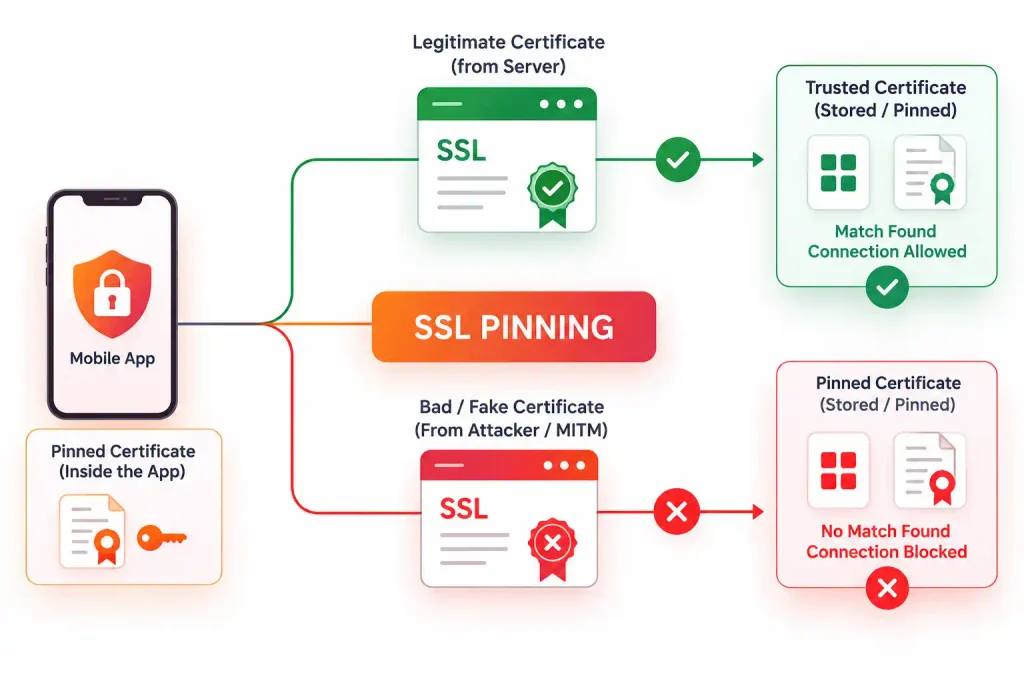
SSL pinning (also called certificate pinning) closes this gap. The app hard-codes a specific certificate or a public key as trusted. It rejects the connection if the server presents anything else, even when the operating system considers the certificate valid.
There are three common pinning approaches:
- Certificate pinning: The app stores the exact server certificate and compares it on every connection.
- Public key pinning: The app stores only the server’s public key hash, which survives certificate renewals.
- CA pinning: The app trusts only certificates issued by a specific CA or intermediate CA.
Why Testers Need an SSL Pinning Bypass?
A mobile app is only as secure as the backend it talks to. Security testers often uncover critical vulnerabilities such as broken authentication, insecure direct object references (IDOR), weak session handling, and API flaws by intercepting, modifying, and replaying requests between the application and its server.
With pinning active, proxy tools like Burp Suite or OWASP ZAP cannot see the traffic. The app simply throws a connection error. Without a bypass, the tester is blind to the API layer, where the most business-critical flaws usually live.
Importantly, bypassing pinning in a test environment does not mean pinning is useless. Attackers with physical access to a device, or with control of a rooted or jailbroken one, can do the same. Testers simulate this realistic threat to measure how well the app resists reverse engineering and runtime tampering.
Implementation of SSL Pinning in Android and iOS
Understanding SSL pinning implementation helps penetration testers identify potential weaknesses and choose appropriate bypass techniques during mobile app security assessments.
On Android, SSL pinning can be implemented through certificate validation logic, custom trust managers, or network security configuration settings. These mechanisms allow an application to verify the server’s certificate against a trusted certificate or public key, rather than relying solely on the device’s trusted certificate authorities.
On iOS, SSL pinning is commonly implemented through server trust evaluation and custom certificate validation logic. Applications can compare the server’s certificate or public key against a predefined trusted value before establishing a secure connection. Some implementations enforce these checks at the native networking layer, requiring testers to examine the app’s trust evaluation process and certificate validation controls.
Applications implement SSL pinning differently, and developers must enforce certificate validation consistently to maintain its effectiveness. During mobile app penetration testing, testers assess whether attackers can bypass these controls and determine whether the application continues to protect sensitive data when they attempt interception.

Book Your Free Cybersecurity Consultation Today!
Common SSL Pinning Bypass Techniques
During mobile app penetration testing, testers choose from several proven approaches depending on the app’s protections.
- Proxy-Based Traffic Interception
An interception proxy allows security professionals to inspect HTTP requests and responses exchanged between a mobile application and its backend server.
During testing, the proxy is configured in an authorised test environment, and the application is directed through it. If the application correctly enforces SSL pinning, it should reject a connection whose certificate or public key does not match its configured trust requirements.
If traffic becomes readable despite the expected restrictions, the tester investigates whether pinning is absent, incorrectly configured, or otherwise ineffective.
- Runtime Instrumentation
Runtime instrumentation involves observing or modifying an application’s behaviour while it is executing. Security testers may use instrumentation frameworks to examine certificate validation functions and determine whether the application depends on runtime checks that can be altered.
This testing can reveal weaknesses such as:
- Certificate validation logic that can be overridden.
- Security checks that are not consistently enforced.
- Trust decisions delegated to modifiable application components.
- Sensitive requests that continue after a validation failure.
Successful circumvention may demonstrate that SSL pinning is not sufficiently resistant to runtime manipulation. However, the impact depends on the application’s other security controls and the access an attacker would need to achieve the same result.
- Certificate and Public-Key Validation Assessment
Developers can implement SSL pinning by comparing server certificates or their public keys with predefined trusted values. During mobile app pentesting, testers examine the implementation to identify weaknesses in these comparisons.
Potential issues include incomplete pinning coverage, incorrect trust configuration, improper certificate validation, and failure to enforce pinning across all relevant API connections.
Public-key pinning gives organisations more flexibility during certificate renewals when they keep the expected public key unchanged. Certificate pinning, by contrast, can require updates when the pinned certificate changes.
Both approaches require secure implementation, appropriate backup pins where applicable, and a reliable certificate rotation process.
- Application Modification and Repackaging
Security testers can examine Android applications through static analysis and, with proper authorisation, modify the application package in a controlled environment. This can help testers identify certificate validation logic, embedded configuration values, and security checks that may be vulnerable to tampering.
Repackaging assessments determine whether modifications can disable or weaken security controls and whether additional protections detect altered application binaries.
Such testing is particularly relevant when an application handles financial transactions, sensitive customer information, or privileged business operations.
Risks Associated With a Successful SSL Pinning Bypass
A successful SSL pinning bypass does not automatically mean that an application is compromised. However, it can expose weaknesses that increase the likelihood or impact of other attacks.
- Exposure of Sensitive Data
If intercepted traffic contains insufficiently protected information, an attacker may gain access to authentication tokens, personal information, account details, or confidential business data.
The actual exposure depends on the data transmitted, the strength of transport encryption, and any additional application-layer protections.
- API Request and Response Manipulation
When traffic can be intercepted and modified, an attacker may attempt to change request parameters or manipulate responses. Depending on backend validation and authorisation controls, this could reveal additional application weaknesses.
For instance, a mobile application that relies on client-side checks without enforcing the same restrictions on its server may be vulnerable to unauthorised operations.
- Increased Risk to Authentication Sessions
Applications that transmit bearer tokens or other session credentials require particular attention. If such credentials are exposed, an attacker may attempt to reuse them, subject to token expiry, device binding, server-side checks, and other protections.
Join our weekly newsletter and stay updated
Best Practices to Prevent SSL Pinning Bypass
Organisations should implement multiple layers of protection rather than relying on SSL pinning as their sole defence.
- Implement certificate or public-key pinning correctly: Apply pinning to relevant connections and ensure trust decisions follow the intended security policy.
- Maintain secure certificate validation: Do not disable hostname verification or accept invalid certificates to resolve connectivity issues.
- Use backup pins and a rotation plan: Prepare for legitimate certificate and key changes to prevent service disruptions.
- Strengthen runtime protections: Consider appropriate tamper detection, application integrity checks, and runtime protections while recognising that client-side controls can be circumvented.
- Enforce security on the backend: Validate authentication, authorisation, input parameters, and transaction rules on the server rather than trusting the mobile client.
- Protect sensitive data: Minimise the information transmitted, avoid exposing secrets in logs, and apply appropriate token management and session controls.
- Conduct regular security assessments: Include SSL pinning validation in mobile app pentesting and repeat testing after significant application, dependency, or infrastructure changes.
Conclusion
SSL pinning strengthens trust between a mobile application and its backend server, but its effectiveness depends on correct implementation and the application’s wider security architecture. A successful SSL pinning bypass can reveal opportunities for traffic interception, sensitive data exposure, and further API security testing.
Regular mobile app penetration testing helps organisations identify these weaknesses before attackers can exploit them. By combining certificate validation, runtime protection, secure backend controls, and systematic security assessments, businesses can improve their mobile application security and reduce the risk of data exposure.
Kratikal’s mobile application security assessment services can help organisations evaluate application vulnerabilities, validate security controls, and prioritise remediation based on risk.
FAQs
- Why should organisations test SSL pinning in mobile applications?
Organisations should test SSL pinning to verify whether their applications properly protect sensitive communication and prevent unauthorised interception of API traffic.
- How does SSL pinning bypass testing benefit an organisation?
SSL pinning bypass testing helps organisations identify weaknesses in certificate validation, assess the exposure of sensitive application traffic, and strengthen their overall mobile application security.
- What risks can organisations face if SSL pinning is weak?
- Is SSL pinning alone sufficient to secure an organisation’s mobile application?
No. Organisations should combine SSL pinning with strong authentication, server-side authorisation, secure API controls, application integrity mechanisms, and regular mobile app penetration testing.
- Should organisations test SSL pinning on both Android and iOS applications?
Yes. Organisations should assess SSL pinning across supported mobile platforms because implementation methods, networking frameworks, and security controls can differ between Android and iOS.