No flashing warning and no loud signal, it just takes a missed software update. An open port nobody noticed. A device sitting in the network for months without anyone checking it, and that is where problems begin. Today, businesses depend on cloud apps, remote teams, shared systems, and connected devices to get work done. It helps teams move faster. But it also creates more ways for attackers to breach, and the risk is growing, too. According to Statista, cyber attacks cost more than $10 trillion to the world in 2025. Indeed, businesses feel the pressure to safeguard their IT infrastructure. But the truth is simple, you cannot fix problems you cannot see. That is where a network scanner tool helps. It checks your systems, finds weak spots, and helps teams act before small risks turn into major problems.
What Is a Network Scanner Tool?
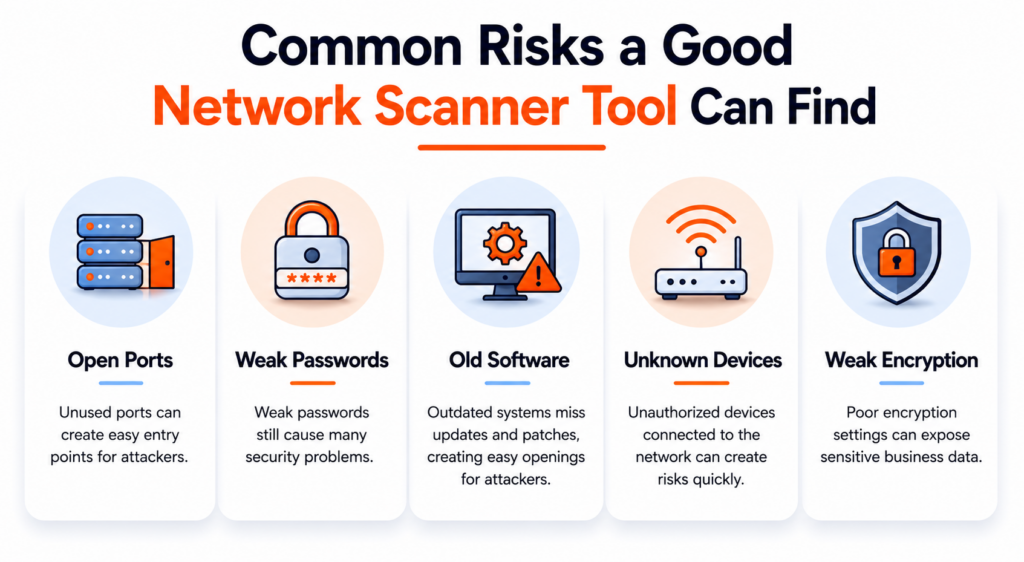
A network scanner tool is like a health check for your network. It scans devices, ports, IP addresses, software, and services connected to your network. Then it points out what looks risky.
- Maybe an old system still runs on outdated software.
- Maybe someone plugged in an unknown device.
- Maybe a service stays open when it should not.
Forbes shared that 69% of small businesses faced cyberattacks in 2025. That number tells a clear story. No business sits outside the risk zone anymore. These things sound small but attackers love small mistakes. Many businesses do not even know everything connected to their network like remote workers join from different devices, vendors log in from outside locations. Old systems stay active long after teams forget about them and it creates blind spots.
A Good Network Scanner Tool Helps Teams.
- Finding open ports
- Spotting old software
- Detecting unknown devices
- Checking weak settings
- Watching unusual activity
- Reducing hidden risks
Without regular checks, problems stay hidden. And hidden problems often become expensive problems.

Book Your Free Cybersecurity Consultation Today!
Why Businesses Need a Network Scanner?
Running a business today feels different. Teams work from home, files move through cloud apps, new devices connect to the network all the time, but fast systems can also create small security gaps. And here is the problem. Most companies do not notice those gaps until something goes wrong.
Maybe an old system still runs in the background, someone connects a device, nobody checks, and a weak setting sits there for months. Cyber attackers look for those small mistakes. They do not always break in through huge security failures. Sometimes, they only need one weak spot. That is why businesses need a network scanner.
A network scanner helps teams find issues fast, protect customer data, and avoid costly downtime. Whether a business has 10 employees or 10,000, knowing what is happening inside the network matters.
Here are a few reasons businesses rely on one:
- Find hidden weak spots before cyber attackers do
- Catch old software that needs updates
- Spot unknown devices inside the network
- Reduce downtime by fixing risks before they occur
- Stay ready for compliance checks and audits
- Get a clear view of the whole network
What to Look for in a Network Scanner Tool
Not every tool works the same way. Some tools only scan once in a while, and others miss serious risks. If you want better protection, here are a few things worth checking.
- Automated Scanning
Nobody wants to scan systems by hand every day. A good tool should scan automatically and flag known risks fast.
- Real-Time Monitoring
Threats can show up anytime. A scanner should help teams spot strange behaviour before it becomes a bigger issue.
- Asset Discovery
A strong network scanner should find every connected device. Even the forgotten ones.
- Clear Reports
Nobody likes confusing dashboards. Teams need reports that make sense. Clear reports help security teams know what needs fixing first.
- Room to Grow
As companies grow, networks grow too. The right tool should handle bigger systems without slowing teams down.
Meet AutoSecT: Kratikal’s Network Scanner
Basic security checks no longer feel enough because businesses need better visibility. That is where AutoSecT comes in. AutoSecT is Kratikal’s advanced network scanner tool built to help businesses find hidden vulnerabilities before attackers do. Instead of waiting for problems to show up, teams can spot risks early and act faster.
AutoSecT helps organisations:
- Find vulnerabilities early
- Monitor network activity
- Discover connected assets
- Spot risky settings
- Prioritise major issues
- AI-driven recommendations
- Improve overall security
Many traditional scanners stop at basic reporting. AutoSecT goes deeper. It helps teams understand risks and fix them without adding extra complexity. For companies that want a smarter and scalable network scanner, AutoSecT offers a simple way to stay ahead of growing cyber threats.
Why Proactive Security Matters
Cybersecurity today is not only about reacting. It is about staying ready. Companies cannot wait for attacks to happen first. That is why more businesses now use a network scanner as part of daily security work.
Regular scanning helps teams:
- Lower risks
- Improve visibility
- Protect sensitive data
- Catch threats early
- Build customer trust
Join our weekly newsletter and stay updated
Conclusion
Even small security gaps can turn into big problems. Cyber attackers only need one loophole to breach your system. That is why regular scanning matters. A strong network scanner helps businesses find hidden vulnerabilities, understand risks, and improve security before trouble starts. Solutions like AutoSecT by Kratikal make that process easier with continuous scanning, better visibility, and smarter threat detection. Because in cybersecurity, finding problems early can save a business a lot later.
FAQs
- What does a network scanner tool do?
A network scanner checks your network for hidden risks like open ports, old software, weak settings, and unknown devices before they become bigger problems.
- Do small businesses need a network scanner tool?
Yes. Attackers often target small businesses because they usually have fewer security layers. A network scanner tool helps spot risks early and keeps systems safer.
- How often should I scan my network?
Regular scans work best. Many businesses scan weekly or monthly, while others choose continuous monitoring to catch issues faster.